Discord webcam overlay for games
Overnook is a free Windows app that shows your friends' webcams from a Discord call in small boxes on top of your game. Click Pop Out on a friend's video in Discord, and Overnook takes that window and puts the picture over the game. Nothing is injected into the game or into Discord. Overnook was called Overcam before.

Overnook for Windows
One exe, about 0.6 MB. No installer and no admin rights. Windows 10 (1903 or later) or Windows 11. The button opens the latest release on GitHub. Releases and changes
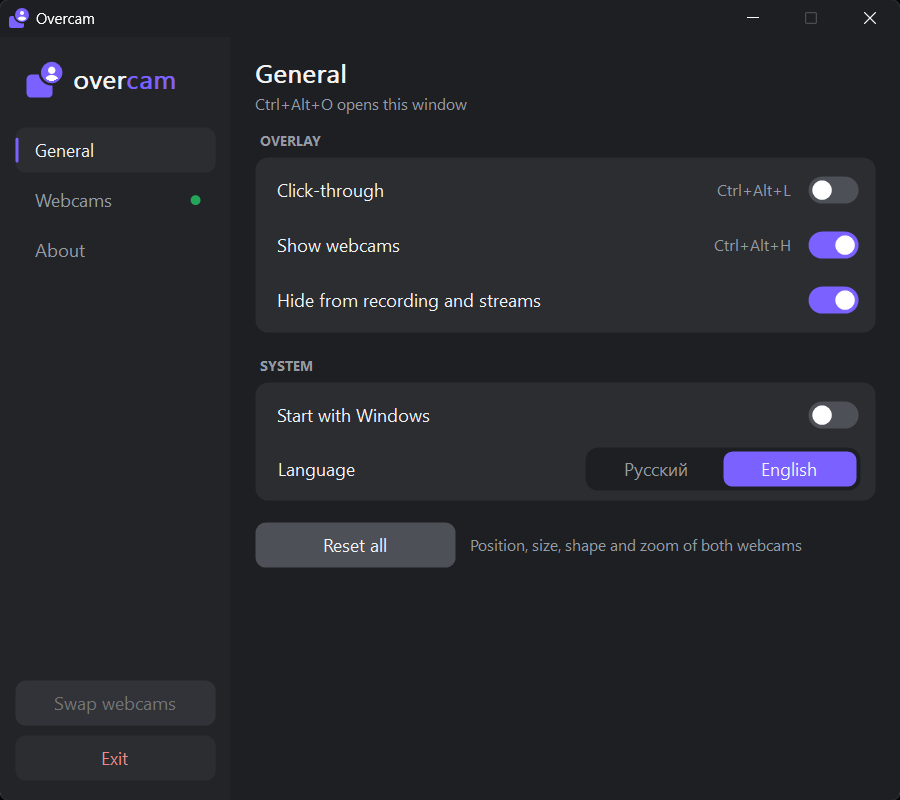
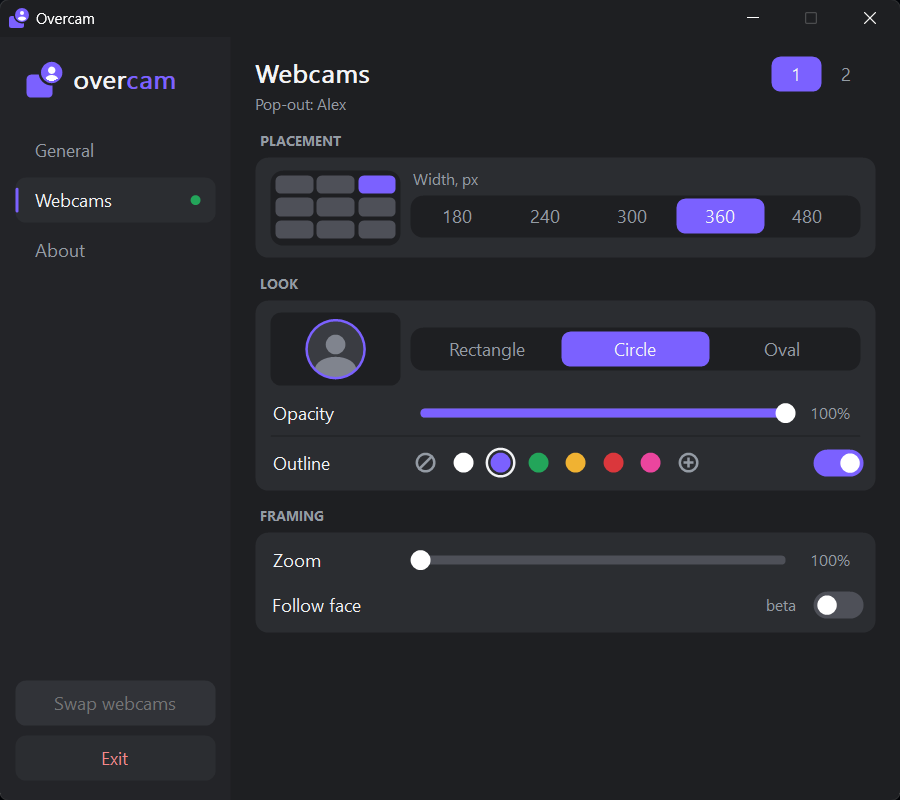
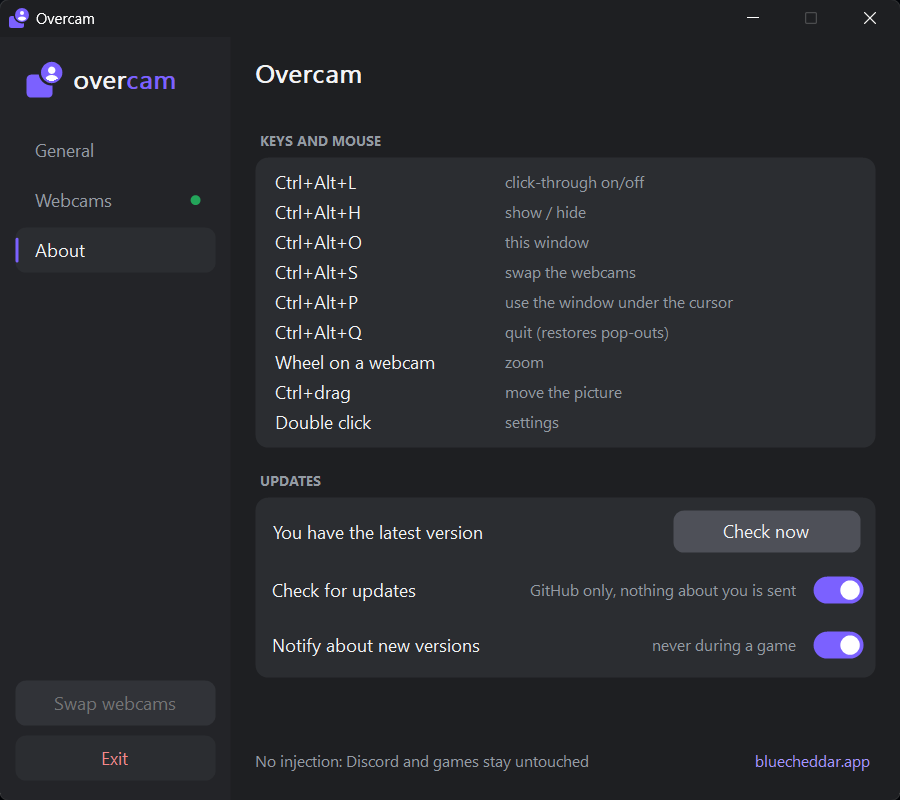
Open settings with Ctrl+Alt+O or a click on the tray icon.
How to use it
- Run Overnook.exe. Windows may say "Windows protected your PC" because the app is new. Click More info, then Run anyway.
- Pop out a video. In a Discord call, click Pop Out on a friend's video.
- Place the box. Overnook shows that video as a box over your game. Drag it where you want it. The mouse wheel zooms, and Ctrl+drag moves the picture inside the box.
- Play through it. Press Ctrl+Alt+L to turn on click-through. Clicks then go through the boxes into the game.
Settings open with Ctrl+Alt+O or a click on the tray icon. Every action has a hotkey. Overnook has no taskbar button, and its boxes never take focus from the game.
Requirements
- Windows: Windows 10 version 1903 or later, or Windows 11.
- Discord: a call with video, opened with Pop Out.
- Games: borderless or windowed fullscreen. Exclusive fullscreen hides every window on top of the game.
- Install: none. One exe of about 0.6 MB, no admin rights. Settings are kept in
%APPDATA%\Overnook. - Price: free.
What the boxes can do
Any place and size
Put each webcam anywhere on the screen, at the size you want.
Rectangle, round or oval
Pick the shape for each box, and an outline color for each webcam.
Zoom and framing
The mouse wheel zooms in on a face. Ctrl+drag moves the picture inside the box.
Follow face (beta)
The box follows the face in the picture. The feature is still in beta.
Up to 12 webcams
One box per popped-out video, up to 12. Smart swap rearranges their positions.
Click-through
With Ctrl+Alt+L on, the mouse works in the game, not on the boxes.
How it works
- When you click Pop Out, Discord opens the video in a window of its own.
- Overnook finds that window, moves it aside and makes it almost fully transparent, so you do not see the video twice.
- Overnook copies the picture with Windows Graphics Capture, the public Windows API that OBS and the Snipping Tool also use, and draws it in its own box over the game.
- When you quit Overnook, the Discord windows go back to normal.
Anti-cheat, privacy and streams
Overnook does not inject code into the game or into Discord, and it does not change Discord's files. Anti-cheat has nothing of Overnook to find in the game process.
The video never leaves your PC. Overnook checks GitHub for updates. If you turn on the voice link, it also gets a sign-in token from discord.com. That is all it sends; see the privacy policy. Updates are signed (ECDSA) and installed from the app.
If you stream or record, "Hide from recording and streams" is on by default. It leaves the boxes out of OBS, Discord Go Live and screenshots, while you still see them on your monitor. It needs Windows 10 version 2004 or later.
Questions
Is Overnook safe to use with anti-cheat?
Overnook stays out of the game. It injects no code into the game or Discord and changes no Discord files, so anti-cheat has nothing of it to find in the game process. It copies the picture with Windows Graphics Capture, the public API that OBS also uses.
Will my stream viewers see my friends' webcams?
No, not by default. "Hide from recording and streams" is on from the start and leaves the boxes out of OBS, Discord Go Live and screenshots. You still see them on your monitor. This needs Windows 10 version 2004 or later.
Does Overnook need to be installed or run as admin?
No. Overnook is one exe of about 0.6 MB with no installer, and it runs without admin rights. Its settings are kept in %APPDATA%\Overnook.
Is Overnook free?
Yes. Overnook costs nothing to download and use, and updates install from the app.
Which Windows versions does it run on?
Windows 10 version 1903 or later, and Windows 11. Hiding the boxes from recordings and streams needs Windows 10 version 2004 or later.
Does it work with games in fullscreen?
Yes, in borderless or windowed fullscreen. A game in exclusive fullscreen hides every window on top of it, so switch the game to borderless or windowed fullscreen in its video settings.
Does it work with Discord PTB and Canary?
Yes. Pop out a video in Discord PTB or Canary the same way, and Overnook picks it up.